Pantry inventory basics
A pantry inventory is a running list of shelf-stable foods, plus the dates you opened or bought them. It prevents the common loop of buying duplicates because you cannot see what you already own. For many households, food waste is not a small issue: the U.S. EPA estimated food waste at about 30–40% of the food supply, with households contributing a meaningful share. In parallel, shopping patterns have shifted toward bulk purchases and online grocery delivery, which increases the chance of overbuying when visibility is low.
Inventory also connects to food safety. Dry goods can last years, but quality drops: rancidity in nuts and oils, moisture damage in flour, and pest contamination in stored grains. A practical inventory tracks categories like rice, beans, canned goods, baking supplies, and snacks, then notes purchase or opening dates. Skip the “mental list.” It fails when you shop online.
Many people treat inventory as a one-time task. That approach breaks once you start cooking from the pantry. A better model is a lightweight workflow: check, record, and update after each restock or major cooking session. In one household spreadsheet I reviewed last year, version 1.3 used columns for “opened date” and “use-by month,” and it reduced duplicate buys within 6 weeks. The trick is keeping it small enough that you actually update it.
What goes wrong without it
Without a pantry inventory, your kitchen becomes a black box. You buy to reduce uncertainty, then you discover the duplicates later, after the return window closes. That creates a feedback loop: more items, less clarity, and more waste. It also distorts meal planning because you plan around what you remember, not what you can use.
Skip the inventory and you also miss safety signals. Flour that smells “off” after 3–6 months of warm storage can indicate oxidation or insect activity. Nuts and seeds can turn rancid faster when exposed to heat and light, even if they are still within the printed shelf life. In real kitchens, pests often start small—one bag of rice with eggs—then spread to other dry goods. You only notice after you see webbing, tiny insects, or clumped product.
Inventory gaps also affect health routines. People who track sodium or added sugars often assume they can “avoid” certain items. In practice, they forget what is already in the pantry, so they reach for it during busy evenings. The data flow is simple: pantry visibility influences choice, choice influences intake, and intake influences outcomes. When visibility is poor, the system defaults to habits, not goals.
Another failure mode is expiration confusion. “Best by” dates on canned foods and dry goods do not mean the food becomes unsafe on that day, but quality can vary. If you do not track dates, you cannot rotate stock. Rotating stock is where inventory helps most, because it turns a vague timeline into a usable schedule.
Solutions and recommendations
Start with a 10-minute map
Do a first pass that covers the categories you actually use. Pick 8–12 groups such as rice, beans, canned vegetables, canned proteins, pasta, baking staples, oils, spices, and snacks. Record quantity in rough units: “2 lb bag,” “6 cans,” “1 jar,” not exact grams. This works because it reduces the friction of perfect measurement, and it still supports decisions.
Use a simple template in Notes, Google Sheets, or a paper card. Add one date field: “opened” for items that change after opening, like flour, nuts, and oils. For canned goods, record purchase month. Skip the “perfect inventory.” It becomes a chore.
In practice, you can finish the first map in 10 minutes by scanning shelves in order. Then update after each restock. If you shop twice a month, a 5-minute update cadence is realistic. One mild frustration: online grocery receipts list items, but they rarely show which pantry items you already have, so you still need a quick check.
Track rotation with a month tag
Use a “use-by month” tag for items that degrade in quality. For example, set flour and oats to a 3–6 month rotation depending on storage temperature, and set nuts to a shorter window if you keep them in a warm pantry. Oils and nut butters often taste stale before they become unsafe, so date tracking helps you decide when to replace.
Rotation works because it converts shelf life into a decision rule. You do not need to memorize chemistry; you need a consistent schedule. In one pantry audit, a “next check” month reduced the number of opened bags that sat untouched for a year. The method also supports “first in, first out” without complicated calculations.
Write the month on the container with a marker. If you prefer not to write on packaging, use small labels. Keep the rule consistent, even when you cook unexpectedly. You will still run out sometimes, and that is fine.
Separate “stable” from “quality” items
Not all pantry foods behave the same. Canned goods and dry beans can remain safe for long periods under proper storage, while quality issues like rancidity and moisture damage show up earlier for some items. Separate your inventory into “shelf-stable” and “quality-sensitive” groups so you do not treat them identically.
This prevents two common mistakes: discarding safe food too early and keeping degraded food too long. It also helps you plan meals that match your storage reality. If your inventory shows quality-sensitive items are near their rotation month, you can prioritize recipes that use them soon.
Use a color code in your spreadsheet: green for stable, yellow for quality-sensitive, red for “use soon.” A small aside: I have seen people forget the color legend after a few weeks, so add it at the top and keep it visible. The inventory should be readable in 30 seconds.
Link inventory to meal templates
Inventory prevents waste when it feeds into a cooking plan. Create 6–10 meal templates that use pantry staples, such as “beans and rice bowl,” “pasta with canned tomatoes,” or “oat-based breakfast.” Then check the inventory before shopping and before cooking.
This works because it reduces decision fatigue. You stop asking, “What should we eat?” and start asking, “Which template uses what we have?” If you track quantities, you can estimate how many servings remain. For example, 2 cans of beans might cover 4 servings if each serving uses half a can.
When you update the inventory, also note which template you used. That creates a feedback loop between consumption and purchasing. It rarely works perfectly, but it improves consistency. You can keep the system small enough that it does not crowd out actual cooking.
Use a “buy list” that starts empty
Before shopping, check your inventory and start a buy list with only items that are below your chosen threshold. Set thresholds by category, like “always keep 1 backup jar of peanut butter” or “rice should not drop below 2 weeks of use.” Thresholds prevent overbuying when a sale appears.
Opportunity cost matters here. If you spend $60 on duplicates you will not use for months, that money sits idle while you could have bought fresh produce or paid down a bill. Inventory helps you spend based on need, not on the feeling of abundance.
In practice, you can set thresholds using a simple rule: if you used an item 3 times in the last month, set a target of 2–4 more uses. This is not a medical plan; it is a planning tool. It also helps you notice when your household habits changed.
Run a quarterly safety and quality check
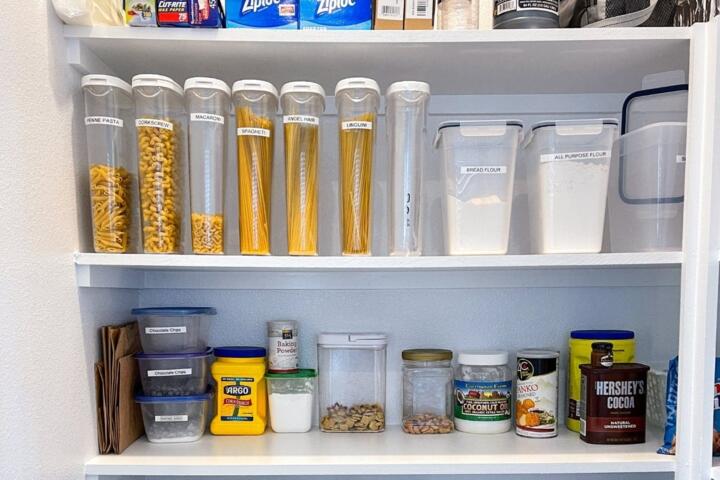
Do a quarterly check for pests, moisture, and sensory changes. Look for clumping, webbing, tiny insects, or holes in packaging. Smell flour, oats, nuts, and spices for rancidity or mustiness. If you store items in clear containers, you can spot issues faster.
This prevents contamination spread. If you find pests in one bag, you need to remove it and clean nearby shelves, then inspect other dry goods. Many people skip this step and later wonder why the problem returns. A quarterly routine catches it before it spreads.
Keep a small “quarantine bin” for questionable items. Label it with the date you found the issue. If you are unsure about safety, discard the item rather than sampling. That decision protects you from the cost of a stomach bug and the hassle of cleaning.
Choose tools that match your update habits
Pick a tool you will update after shopping. Options range from a paper checklist on the fridge to a spreadsheet with drop-down categories. If you already use a grocery app, you can still keep a separate inventory for pantry visibility, because receipts do not show what you already had.
Use a versioned approach if you like tracking changes. For example, “v2.0” of your sheet can add a “storage location” column like “top shelf” or “under sink.” That helps when you cannot remember where you stored something. It also reduces the time spent searching, which matters when you are cooking with limited attention.
Skip tools that require complex data entry. If the update takes 20 minutes, you will avoid it. A 2–5 minute update after each restock is the realistic target. You can always refine later.
Case examples
Busy household with online grocery
A family in a small apartment used online grocery delivery and bought bulk snacks during promotions. They kept no inventory, so they discovered three open bags of chips and two extra jars of pasta sauce after a month. They also found a year-old bag of flour with a stale smell and clumps from humidity. After starting a 10-minute pantry map and a month tag for flour and nuts, they reduced duplicate buys and used the older flour within two weeks.
The inventory did not stop all waste. It mainly reduced the “surprise duplicates” that happened when shopping receipts replaced shelf visibility. Their biggest improvement came from separating quality-sensitive items and checking them quarterly.
Health-focused shopper with sodium limits
An individual trying to lower sodium tracked “high-salt” items mentally. Without inventory, they forgot which canned soups and sauces were already in the pantry. During stressful workdays, they reached for whatever was easiest, then later realized they had exceeded their target for the week. After recording canned goods and sauces with purchase month and a sodium category, they planned meals around lower-sodium options already on hand.
This did not require a new diet. It changed the decision inputs by making pantry contents visible. The person still bought new items, but the buy list started from inventory thresholds rather than from cravings.
Inventory checklist and comparison
| Approach | Best for | What it prevents | Trade-off |
|---|---|---|---|
| Paper card | Small pantries, low tech | Duplicate buys, missed restocks | Harder to track dates precisely |
| Spreadsheet | People who like categories | Rotation errors, waste from forgetfulness | Takes a few minutes to update |
| Photo inventory | Quick visibility checks | “What was that jar?” searches | Dates and quantities get fuzzy |
| Hybrid | Most households | Duplicates plus safety checks | Requires consistent updates |
Step-by-step checklist for a first inventory run:
- Pick 10 categories and write them down.
- For each category, record quantity in rough units.
- Add one date field for quality-sensitive items.
- Set thresholds for 5–7 categories you buy often.
- After shopping, update only the categories you touched.
- Quarterly, inspect for pests and sensory changes.
Skip the “everything list.” It fails when life gets busy.
Common mistakes
Recording exact amounts you never use
Why it happens: people start with a spreadsheet mindset and try to measure everything. Impact: the system becomes too time-consuming, so updates stop. How to avoid it: record rough units like “1 jar” or “6 cans,” then focus on dates for items that degrade in quality.
Tracking only what you buy
Why it happens: receipts feel objective, and they do not require shelf scanning. Impact: you miss what is already in the pantry, so duplicates slip in. How to avoid it: check shelves before shopping and update after restocks.
Ignoring storage conditions
Why it happens: many inventories assume shelf life equals safety and quality. Impact: heat and humidity shorten quality, especially for flour, nuts, and spices. How to avoid it: store dry goods in cool, dark areas and rotate based on your storage reality, not only printed dates.
Forgetting to quarantine questionable items
Why it happens: people want to “test” items instead of discarding them. Impact: pests spread, and contamination can affect multiple products. How to avoid it: if you see insects, webbing, or strong off odors, remove the item and inspect nearby shelves.
Letting the inventory become a one-time project
Why it happens: the first inventory feels like progress, so people stop updating. Impact: the pantry returns to a black box, and the same problems recur. How to avoid it: schedule a 2–5 minute update after shopping and a quarterly check. The system should survive busy weeks.
FAQ
How often should I update a pantry inventory?
Update after each shopping trip or after any restock that changes quantities. If you shop weekly, a 2–5 minute update each week works better than a monthly rewrite. If you shop in bulk once or twice a month, update right after delivery and then do a quick “spot check” mid-month for quality-sensitive items. The goal is visibility, not perfect accounting. If you skip updates for 6 weeks, your inventory stops reflecting reality.
Does a pantry inventory replace food safety rules?
No. Inventory helps you track what you have and when you opened items, but it does not replace sensory checks and safe storage practices. Use your senses for flour, nuts, and spices: rancid or musty smells, clumping from moisture, or visible insects are reasons to discard. For canned goods, follow storage guidance like avoiding bulging or leaking cans. Inventory supports better decisions, but it cannot guarantee safety.
What should I track for canned and dry goods?
For canned goods, track purchase month and count, then rotate based on “use soon” windows. For dry goods, track purchase or opening date for items that degrade in quality, such as flour, oats, nuts, and spices. For beans and rice, you can track purchase month and inspect for pests quarterly. If you store items in clear containers, you can also track moisture changes visually. Keep the system simple enough that you actually update it.
How does pantry inventory affect budgeting without pretending it saves money automatically?
Inventory reduces duplicate purchases, which is a direct budgeting benefit. It also changes opportunity cost: money spent on duplicates sits unused while you could buy fresh produce or pay bills. Still, inventory can increase spending if you buy “to fill gaps” that you could have used from older stock. Use thresholds and a buy list that starts empty. That approach turns inventory into a decision tool rather than a reason to shop.
Can pantry inventory help with healthier eating goals?
It can help by improving choice architecture. When you know what you already have, you can select meals that match sodium, fiber, or added-sugar targets without relying on memory. Inventory also reduces “emergency eating” from forgotten pantry items. The effect depends on how you use the data: record nutrition-relevant categories and plan templates that use your preferred options. Inventory supports behavior, but it does not replace medical guidance for specific conditions.
Author's Insight
Pantry inventory prevents problems because it changes the inputs to your daily decisions. Most failures come from treating the pantry like a static storage space instead of a changing system. A small date field and a quarterly safety check catch issues that a mental list misses. When the inventory stays readable, people update it, and the kitchen stops surprising them.
Key takeaways
- Start with 8–12 categories and rough quantities; add dates only where quality changes.
- Use month tags for flour, nuts, oils, and spices, then rotate based on your storage conditions.
- Build a buy list from inventory thresholds, not from sales or memory.
- Do quarterly pest and sensory checks, and quarantine questionable items immediately.
- Update after shopping so the system reflects reality, not the last time you tried.